Microsoft Teams integration
No new portal. No new login. No training. WeActis meets your employees exactly where they already spend their day.
 Microsoft Teams
Most security tools are built for admins and security teams, not for the employees who actually create the data exposure and should be fixing it. Asking them to log into yet another tool is one more thing on top of their real job, and one more reason for them not to fix it.
of employees who violate cybersecurity guidance do so to prioritize business needs
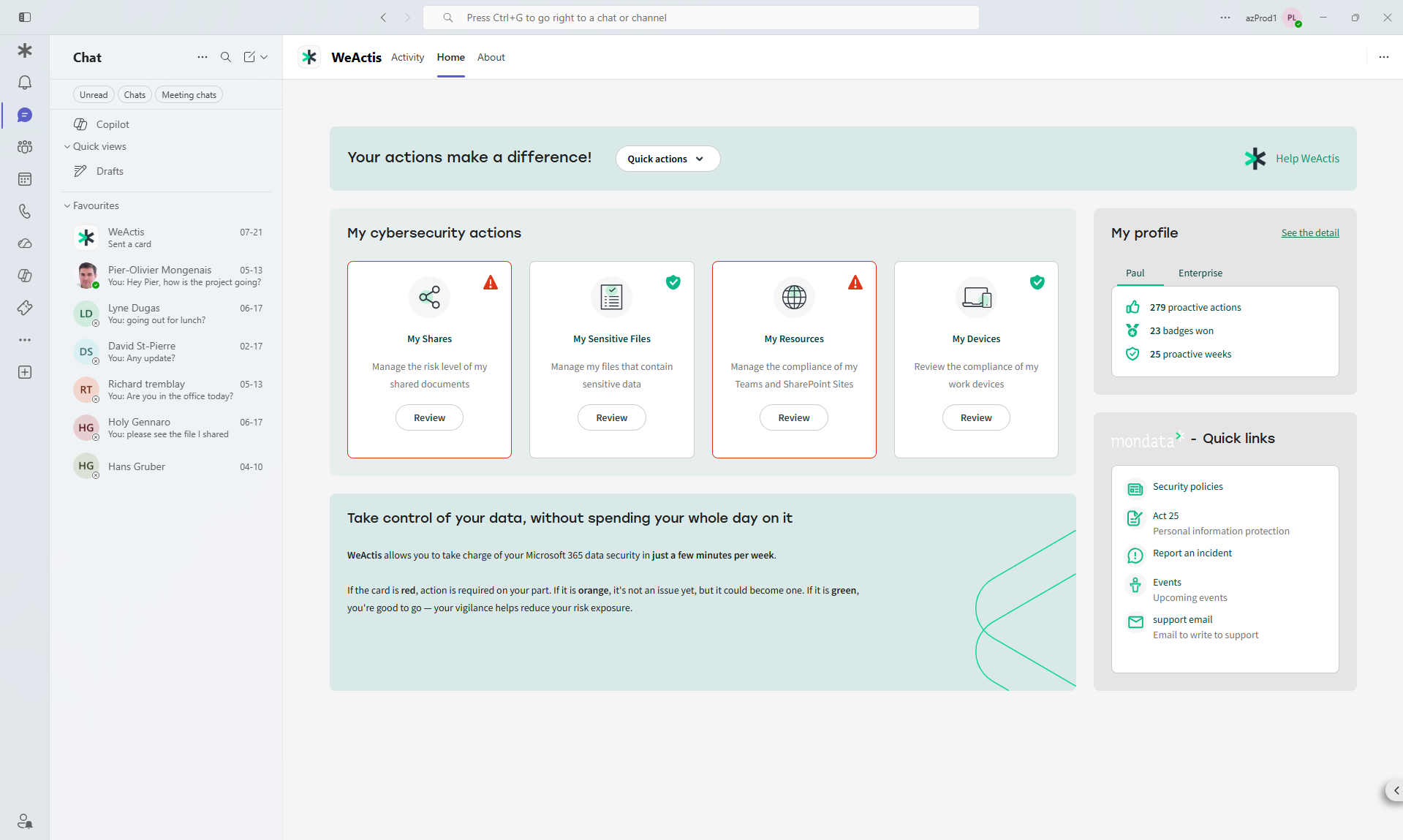
Gartner, 2025WeActis is delivered as a native Microsoft Teams app, installed through the Teams Admin Console. There is no separate portal. Authentication is delegated through Entra ID, and WeActis always acts with the employee's own access token, never an elevated admin token. It structurally cannot exceed what that employee can already do. Notifications, badges, approvals, and quick remediation actions all surface as Teams messages and a home page banner.
Native to Microsoft Teams

AI rollout accelerated by easy integration and impressive onboarding process
Director, IT Security and Risk ManagementRetail
A deliberate bet on where oversharing gets fixed.
Teams is where collaboration actually happens for most Microsoft 365 organizations today. Meeting people there, instead of asking them to visit one more admin tool, is the single biggest reason WeActis reaches real, sustained engagement.

Questions we hear a lot
Do employees need to access a new portal to use WeActis?
No. WeActis is a Microsoft Teams-native app. There is no new portal, no new login, and no separate interface to learn. Everything happens inside the Teams environment employees already use every day.
Where do WeActis notifications appear in Teams?
As Teams messages and a home page banner, alongside badges, approvals, and quick-action buttons. WeActis notifications surface in the channels employees already check, which is why action rates are significantly higher than email campaigns.
What Microsoft 365 permissions does WeActis require?
WeActis uses read permissions via the Microsoft Graph API to sync metadata (not file content), and delegated write permissions scoped to the actions employees are authorized to perform, such as revoking a share they themselves granted.
Can WeActis be deployed tenant-wide from the Teams Admin Center?
Yes. WeActis is available as a Microsoft Teams app and can be pre-installed and pinned by IT from the Teams Admin Center, ensuring all employees see it in their Teams sidebar without manual intervention.
What actions can employees take directly inside WeActis in Teams?
Employees can review their prioritized list of risky shares, revoke individual shares, use express revocation to clear all moderate and high-risk shares at once, extend shares and apply or review security models, all without leaving Teams.
Does WeActis work on the Microsoft Teams mobile app?
Yes. Because WeActis is a Teams-native app, it is accessible on both the desktop and mobile version of Microsoft Teams.
See everything WeActis can do
See the Microsoft Teams integration for yourself.
See how easy it is for a data owner to take action inside Microsoft Teams, no new platform to learn.