Oversharing remediation
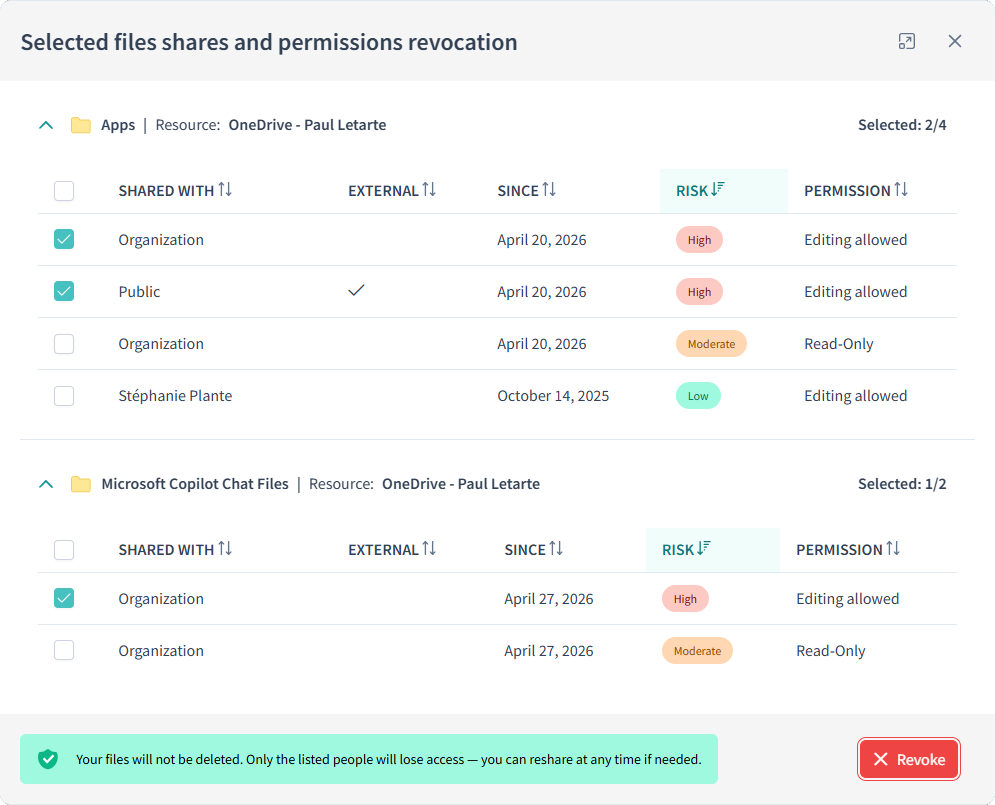
Employees revoke, extend, or clean up their own risky shares in less than two minutes a week right where they already work, in Microsoft Teams.
Sharing a file used to mean attaching a specific version to an email. Now, with collaboration environments, the default is a live link that keeps working long after anyone remembers creating it. Outlook suggests links over attachments, mentioning someone in a comment gives them ongoing access to the file, and dragging a file into a Teams conversation creates yet another share. Employees are sharing to collaborate, not to create a security problem.
of policy violations were a calculated business tradeoff, not malice
Gartner, 2025Every employee and site owner gets a personal, prioritized list of their own risky shares, classified by low, moderate, or high risk level. From there, they can revoke a share, extend it if still needed, or clear everything above a certain risk level, in one click. Revoking a share will only remove the unnecessary access and keep the underlying file available to its owner.
Only employees with something to fix get notified, on a schedule IT controls. The whole action takes under two minutes.
Remediate in a couple of clicks, right inside Teams

Great solution for file share security management on M365
VP, ITFinance
Seeing the risk is not the same as fixing it. WeActis ensures remediation at scale.
Most reporting tools can show a flat list of sharing links. They cannot get anyone to act on it. WeActis does, by putting it in front of the person who created the risk in the first place.

Questions we hear a lot
What is oversharing in SharePoint, and how does WeActis address it?
Oversharing is when content in Microsoft 365 is accessible to more people than necessary through broad sharing links, overly permissive group memberships, or forgotten guest access. WeActis surfaces each instance to the employee who created it and guides them to revoke or extend it, directly inside Microsoft Teams.
How long does remediation take for an employee using WeActis?
Most actions take under two minutes a week. Employees can revoke a single share, extend one, or use WeActis's express revocation to clear every moderate or high-risk share at once.
Does revoking a share in WeActis delete the file?
No. Revoking a share in WeActis only removes the access that was added on top of what already existed. The file itself is untouched, and anyone who could access it before the share was created can still do so.
How are employees notified by WeActis to remediate?
Through Microsoft Teams, on a cadence IT controls (daily, weekly, bi-weekly, or monthly), and only for users who have risky shares to act on. No one receives a notification if they have nothing to fix.
What about shares people still need?
Employees can extend a share instead of revoking it. No justification is required by default. The person who created the share makes the call, and that decision is recorded in WeActis's audit trail.
Can WeActis remediate oversharing without Microsoft Purview being configured?
Yes. WeActis scores and surfaces risky shares using structural signals — link type, permission level, and share duration — independently of Purview classification. When Purview matures, WeActis enriches its scoring with sensitivity labels automatically.
How does WeActis help meet Copilot readiness requirements around oversharing?
Microsoft 365 Copilot and agentic AI surface whatever content a user can technically access. WeActis systematically reduces that access footprint before Copilot is deployed, ensuring AI does not amplify existing oversharing across your tenant.
See everything WeActis can do
See oversharing remediation for yourself.
See how easy it is for a data owner to take action inside Microsoft Teams, no new platform to learn.